
How to Use an AI Document Editor Without Losing Your Voice
A practical AI document editor workflow for drafting, revising, fact-checking, and keeping your own voice in the final document.


Updated July 17, 2026
The best way to use an AI document editor is to keep control of the argument while delegating smaller jobs: outlining, restructuring, tightening a section, finding gaps, and checking consistency. Give the editor a brief and source material before it drafts. Review changes in small passes. Verify every factual claim that matters.
That approach is slower than asking for a finished report in one prompt. It is also far more likely to produce a document that sounds like you and survives a careful read.
What an AI document editor should help you do
An AI document editor is a writing surface where an AI assistant can work with the document itself instead of sending every new paragraph to a separate chat. Depending on the product, it may draft sections, rewrite selected text, suggest structural changes, use attached sources, or make edits across the document.
The useful distinction is between generating text and editing a document. A chatbot can give you a new paragraph. A document editor should help you place that paragraph, revise it in context, reject a bad change, and continue working without rebuilding the whole draft.
Google’s official help for writing and editing with Gemini in Docs reflects this shift. It documents targeted edits, document-wide suggestions, source files, style references, and the choice to accept or reject changes. The feature details vary by product, but the pattern is sensible: AI works best as part of an editing loop, not as a one-click author.
| Job | Give the AI | Keep for yourself |
|---|---|---|
| Outline | audience, goal, constraints, required sections | the main argument and what deserves emphasis |
| First draft | approved outline and source notes | judgment about whether the draft says anything useful |
| Revision | one section and one editing instruction | approval of every substantive change |
| Fact check | a list of claims and source links | opening sources and confirming that they support the claims |
| Voice edit | representative writing samples and specific rules | the final read for tone, rhythm, and intent |
Use a controlled document workflow
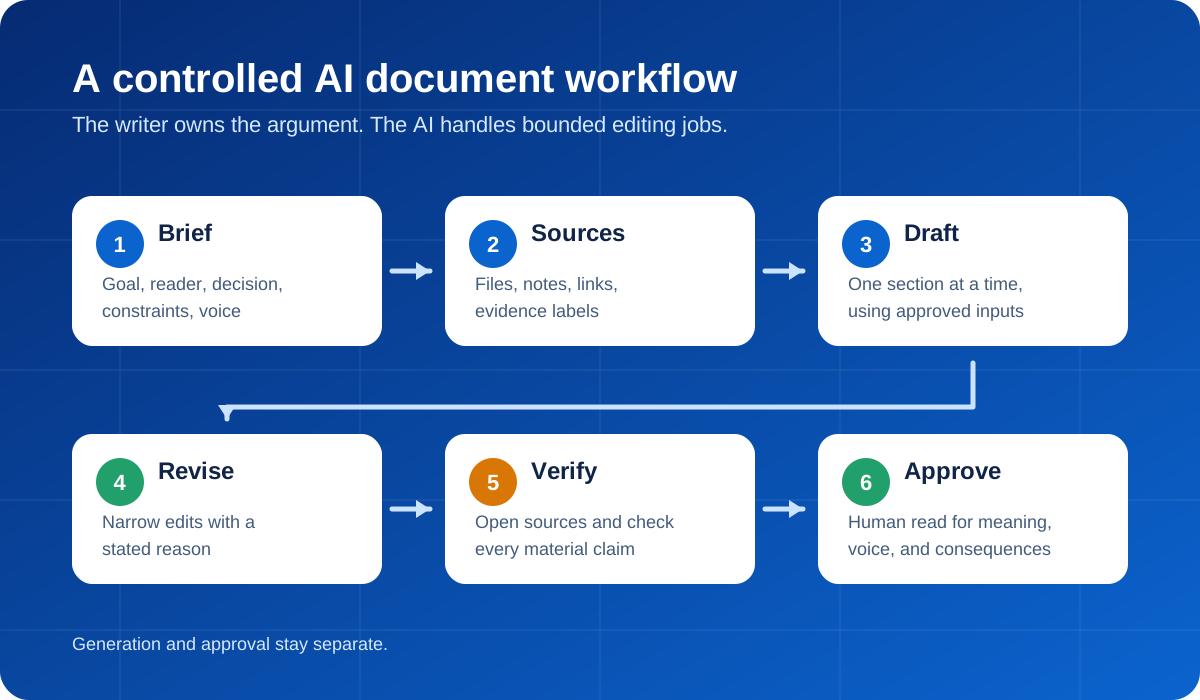
1. Write the brief before the draft
A blank document invites the model to make decisions you have not made yet. It will choose an audience, level of detail, structure, and tone based on patterns rather than your actual goal.
Start with a short brief:
Document: customer onboarding proposal
Reader: operations lead at a 50-person software company
Decision: whether to approve a six-week onboarding redesign
Main point: the current handoff creates avoidable delays
Evidence available: support tags, interview notes, process map
Must include: current problem, proposed change, owner, timeline, risks
Must avoid: invented metrics, generic claims about "transformation"
Tone: direct, practical, no sales language
Then ask the editor to challenge the brief before writing:
What is missing from this brief?
List the questions that would materially change the recommendation.
Do not draft the proposal yet.
This catches a common failure early: polished prose built on an unfinished decision.
2. Build a source pack
Put the facts the document may use in one place. That might be meeting notes, a PDF, a spreadsheet summary, product documentation, interview transcripts, or links to primary sources.
Label the material. A simple source note is enough:
[S1] Interview notes, 12 July: onboarding lead describes duplicate data entry.
[S2] Support export, Q2: use only the counts in rows 14-22.
[S3] Current process map: approved version dated 8 July.
Tell the AI to distinguish source-backed statements from suggestions:
Use only the attached source pack for factual claims.
Add [S1], [S2], or [S3] after each supported claim.
Mark recommendations as recommendations, not facts.
If the sources do not support a detail, write [SOURCE NEEDED].
This does not guarantee accuracy. It gives you a trail to inspect.
3. Draft in sections, not all at once
A full-document prompt can be useful for a rough skeleton. It is a poor way to settle every paragraph at once. Draft one meaningful section, review it, then continue.
For the proposal above, the first pass might cover only the current process and the case for change. Once that section is right, move to the recommended workflow. This keeps a weak assumption from spreading across five pages.
Ask for alternatives when a section could take more than one shape:
Draft two versions of the opening.
Version A should lead with the operational problem.
Version B should lead with the decision required.
Keep each under 120 words and use only [S1]-[S3].
Choosing between two approaches is often easier than repairing one overconfident draft.
4. Make narrow edits with a stated reason
“Improve this” is an invitation to rewrite your voice. Name the problem instead.
Shorten this section by about 20 percent.
Keep the examples, dates, and conclusion.
Remove repeated setup and abstract language.
Do not make the tone more formal.
Or ask for diagnosis before revision:
Do not edit yet.
Identify the two sentences that make this section hard to follow.
Explain the problem in each, then propose a replacement.
Narrow instructions make changes easier to evaluate. They also reduce the chance that a useful phrase, caveat, or piece of evidence disappears during a broad rewrite.
5. Run a claim check separate from the prose edit
Fluent writing can make weak claims harder to notice. NIST’s Generative AI Profile treats “confabulation,” confidently presented false or erroneous content, as a core generative AI risk. A clean sentence is not evidence.
Create a claim ledger after the draft:
Extract every checkable claim from this document.
Return a table with:
- exact claim
- section
- cited source
- direct support, partial support, or no support
- what I should verify manually

Do not rewrite the document in this step.
Open the cited sources yourself. Check names, dates, numbers, quotations, product capabilities, and any sentence that could affect a decision. If the document is legal, medical, financial, safety-related, or otherwise high stakes, use a qualified reviewer rather than treating an AI pass as approval.
The Government of Canada’s guidance on generative AI gives a useful general rule: treat AI output as non-authoritative, review and correct it, and do not enter sensitive information into an unapproved tool.
6. Put your voice back in
AI editing often smooths away the parts that sound like a person. Concrete language becomes abstract. Uneven but natural rhythm turns into paragraphs of identical length. Every section ends with a tidy takeaway.
Give the editor two or three writing samples that genuinely represent the voice you want. Do not ask it to “sound human.” Describe the observable choices:
Match these traits from the samples:
- start with the point instead of a warm-up
- use short sentences when a decision is clear
- prefer concrete verbs to business jargon
- keep honest caveats
- do not add rhetorical questions, slogans, or neat three-item conclusions
Then read the result aloud. If you would never say a sentence, change it. Voice is not a vocabulary preset. It is what you notice, what you leave out, and how directly you are willing to say the thing.
Microsoft Research and Carnegie Mellon researchers surveyed 319 knowledge workers about generative AI and critical thinking. They found that higher confidence in AI was associated with less critical thinking, while the work of using AI shifted toward verification, integration, and oversight. That is a good description of the editor’s job: the AI can produce options, but someone still has to own the document.
A complete prompt for starting a document
Help me create a document, but do not write the full draft yet.

Goal: [what the document must accomplish]
Reader: [who will read it]
Decision or action: [what should happen after reading]
Main argument: [your current view]
Required sections: [list]
Constraints: [length, format, deadline, policy]
Sources: [attached files or labeled source notes]
Voice: [specific traits, plus examples if available]

First:
1. identify missing information that could change the document
2. propose an outline with a purpose for each section
3. flag claims that will need evidence
4. wait for my approval before drafting

When drafting, use only the approved outline and sources.
Mark unsupported factual details as [SOURCE NEEDED].
The prompt is intentionally procedural. A document is easier to control when the assistant pauses before it turns assumptions into paragraphs.
A useful walkthrough for building a repeatable writing system
Tiago Forte’s video below is worth watching if you write often enough to maintain a reusable style and process guide. It focuses on representative samples, explicit examples, instruction priority, and feeding corrections back into the system rather than starting from zero each time.
Keep the conversation and document together
The awkward version of AI writing happens across too many surfaces: sources in one tab, chat in another, a draft somewhere else, and a second model in a fourth place. Context gets lost each time you copy a section across.
OrbiChat keeps the conversation, source files, model choice, and document workspace together. You can draft with one model, ask another to critique a section, and revise the document without treating each step as a new project. Use the second model for a defined job, such as finding unsupported claims or testing the argument, rather than generating another entire draft for the pile.
FAQ
What is an AI document editor?
An AI document editor combines a writing surface with an AI assistant that can draft, revise, restructure, summarize, or comment on the document in context. The useful ones let you target specific sections and review changes instead of replacing the whole document blindly.
Can an AI document editor write a full report?
It can produce a full draft, but that should be a starting point. Give it an approved brief and sources first. Then check the argument, evidence, and wording section by section before the report is used or shared.
How do I stop AI from changing my writing voice?
Use representative samples and describe concrete style rules. Ask for narrow edits, not a general “improvement.” Preserve specific examples and caveats, reject unnecessary rewrites, and read the final document aloud.
How should I fact-check an AI-written document?
Extract every checkable claim into a claim ledger, connect each claim to a source, and open the sources yourself. Verify quotations, names, dates, numbers, and claims that affect a decision. A citation supplied by an AI model may be wrong or may not support the sentence attached to it.
Is it safe to upload confidential documents to an AI editor?
Only if the tool is approved for that information and its data handling terms meet your organization’s requirements. Remove sensitive material when possible. Do not upload personal, proprietary, regulated, or confidential information to an unapproved service.
Should I use one AI model or several for document editing?
One capable model is enough for most drafting and revision. A second model helps when you give it a separate role, such as challenging the argument, checking source coverage, or finding ambiguous language. Comparing two complete drafts usually creates more editing work than it saves.
Media credit: cover photograph by Carter Hightower on Unsplash, cropped and overlaid with editorial text by OrbiChat, used under the Unsplash License. Workflow diagram by OrbiChat. Embedded video by Tiago Forte on YouTube.